

Impersonate users
This document describes how users assigned the Admin account type can assume the permissions and access of another user in their organization to assist with troubleshooting, maintain data security, and better manage documents.
Requirements
If you use OAuth to authenticate to your organization, you cannot impersonate users in the UI.
To impersonate another user, you must be assigned the Admin account type. Users who are only team admins cannot impersonate other users.
Overview
Impersonating users allows admins to act as a user and view, edit, and access Sigma resources based on the user’s account type.
An admin can impersonate a user in the UI or when using the API:
- Impersonate a user in the UI, for example, to identify and troubleshoot issues that a user experiences from their perspective, or validate row-level security (RLS) and column-level security (CLS).
- Impersonate a user in the API, for example, to verify which documents a user can access and the corresponding access levels, retrieve a list of files in a user’s Documents folder, or make changes on behalf of a user in embedded content.
When you impersonate a user, an event is created in audit logs that identifies the user and the impersonating user.
Impersonate a user
Follow the steps below to impersonate a user in your organization. You can impersonate a user on the Users or Teams tabs.
Users assigned the Admin account type can only impersonate non-admin users. Admins cannot impersonate other admins.
For Snowflake and PostgreSQL connections, the impersonation also applies to the role and warehouse attribute used on your connection.
Impersonate a user from the Users tab
-
Go to Administration > Users:
-
In the Sigma header, click your user avatar to open the user menu.
-
Select Administration to open the Administration portal.
-
In the side panel, select Users.
-
-
Select a user to impersonate.
-
On the user profile, click Impersonate user.
-
At the top of the Sigma UI, you see a banner that identifies the user that you are impersonating. During the impersonation session, you can view, edit, and access Sigma resources based on the user’s account type.

-
To end the session, in the yellow banner, click Stop impersonation. You return to the user’s profile logged in as yourself.
Impersonate a user from the Teams tab
-
Go to Administration > Teams:
-
In the Sigma header, click your user avatar to open the user menu.
-
Select Administration to open the Administration portal.
-
In the side panel, select Teams.
-
-
Select the team with the user that you want to impersonate.
-
Locate the user that you want to impersonate, then click the
 (More) menu and select Impersonate user.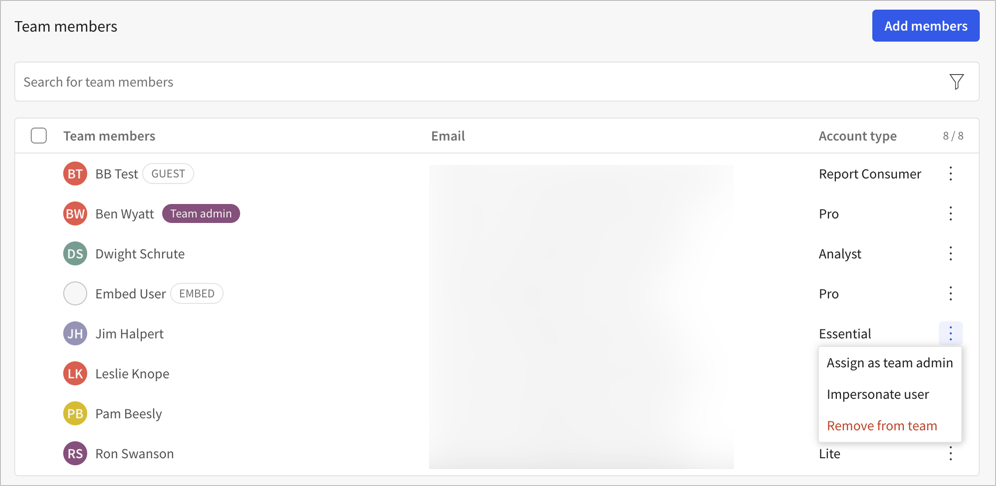
-
At the top of the UI, you see a yellow banner that confirms the identity of the user you are impersonating. During the impersonation session, you can view, edit, and access Sigma resources based on the user’s account type.
Impersonate users for API calls
This documentation describes one or more public beta features that are in development. Beta features are subject to quick, iterative changes; therefore the current user experience in the Sigma service can differ from the information provided in this page.
This page should not be considered official published documentation until Sigma removes this notice and the beta flag on the corresponding feature(s) in the Sigma service. For the full beta feature disclaimer, see Beta features.
For most API endpoints, you can impersonate other users and retrieve information or perform actions on behalf of other users. As with all impersonation, you must be assigned the Admin account type.
To impersonate users for API calls, do the following:
-
Generate client credentials, if you do not already have them, to use for the Sigma REST API.
-
Get an access token with your client credentials to use in a future API call.
-
Generate a self-signed JWT token for each user that you want to impersonate:
-
To impersonate a user in your organization, provide the
subclaim and specify the email address of the user that you want to impersonate. -
To impersonate a user in a tenant organization as an admin in the parent organization, provide the
subclaim and specify the email address of the user that you want to impersonate, and provide thetenantclaim with the organization ID of the tenant organization. -
To perform actions in the tenant organization as the
TenantAdminRobot, provide thetenantclaim with the organization ID of the tenant organization and do not provide asubclaim.If the tenant organization is in a different region than the parent organization, get the access token (step 2) and the impersonation token (step 4) using the base URL of the parent organization. Then, perform API calls as the impersonated user (step 5) using the base URL for the region and cloud provider in which the tenant is hosted. For details about which URL to use and how to identify the region, see Supported cloud platforms and regions.
-
-
- Provide the access token to authenticate the request and as the
actor_token. - Provide the self-signed JWT token as the
subject_token.
- Provide the access token to authenticate the request and as the
-
Use the impersonation token included in the response as the bearer token to authenticate API requests that you perform as the impersonated user.
For an example script that performs all of these steps, refer to the Example Python script for impersonated API calls.
Limitations
The following API endpoints do not support an impersonation token. Requests made with an impersonation token to any of the following endpoints fail to return results:
- Get connection path for a table (
GET /v2/connections/paths/{inodeId}) - Look up connections by path (
GET /v2/connection/{connectionId}/lookup) - Export data from a workbook (
POST /v2/workbooks/{workbookId}/export) - Export a workbook (
POST /v2/workbooks/{workbookId}/send) - Export data from a report (
POST /v2/reports/{reportId}/export) - Export a report (
POST /v2/reports/{reportId}/send) - Add workbook schedule (
POST /v2/workbooks/{workbookId}/schedules) - Add report schedule (
POST /v2/reports/{reportId}/schedules)
Example Python script for impersonated API calls
The following example Python script does the following:
- Get an access token and print it to the console.
- Generate a self-signed JWT token using the jwt library
- Generate an impersonation token using the access token and the self-signed JWT token.
- Get current user details with both the access token and the impersonation token.
- Get the list of workbook files accessible to the admin and impersonated user using the List files (
GET /v2/listfiles) endpoint.
Do not use this script in any client-facing code. This example script prints sensitive details to the console, such as API access tokens, for testing and validation purposes.
Before running the script, update the code to provide the following details as environment variables or with another secure method:
- REST API client ID
- REST API client secret
- Base URL for API calls. If you impersonate a tenant in a different region, use the base URL for the region the tenant is deployed in for performing tasks in the tenant.
- Email address of the user to impersonate, or the tenant organization ID, if performing tasks in a tenant organization as an admin.