
DateParse
This function isn’t compatible with all data platform connections. To check if your connection supports it, see Supported data platforms and feature compatibility.
The DateParse function parses a text string representing a date in the specified format and returns the equivalent ISO datetime value (YYYY-MM-DD HH:MM:SS).
If the input is a text or number value that reflects ISO (YYYY-MM-DD or YYYY-MM-DD HH:MM:SS) or Unix time format, you can use the Date function, which doesn’t require you to specify the input format.
Syntax
Function arguments
Compatible format specifiers
The DateParse function uses the datetime formatting functionality of the connected CDW or DBMS. The following format specifiers are supported by most connections and can be used to build the datetime format string.
BigQuery doesn’t support the %L and %f specifiers.
Because two-digit years converted with the %y conversion are ambiguous, dates with a %y of 00–69 convert to 2000–2069 and dates with a %y of 70–99 convert to 1970–1999.
Examples
Example 1
Parses the text string "03-Sep-2020:03:05:13" and returns the equivalent ISO datetime value 2020-09-03 03:05:13.
Example 2
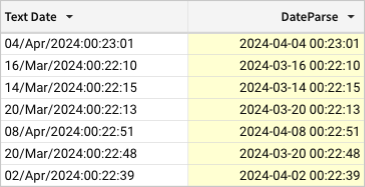
Parses text strings in the Text Date column using the specified format (%d/%b/%Y:%H:%M:%S) and returns equivalent values in ISO datetime format.
Example 3
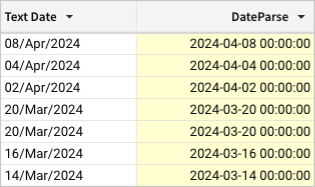
Parses text strings in the Text Date column using the specified format (%d/%b/%Y) and returns the equivalent values in ISO date time format.