
ArrayAgg
This function isn’t compatible with all data platform connections. To check if your connection supports it, see Supported data platforms and feature compatibility.
The ArrayAgg function identifies non-null row values in a column or group and aggregates them into a single array.
The ArrayAgg function is an aggregate function.
Aggregate functions evaluate one or more rows of data and return a single value.
In a table element, the aggregate is calculated for each grouping. For information on how to add a grouping with an aggregate calculation to a table, see Group columns in a table.
In a table with no groupings, the aggregate is calculated for each row. For information on how to calculate summary statistics across all rows in a table, see Add summary statistics to a table.
To learn more about using aggregate functions, see Building complex formulas with grouped data.
Syntax
Function argument:
Example
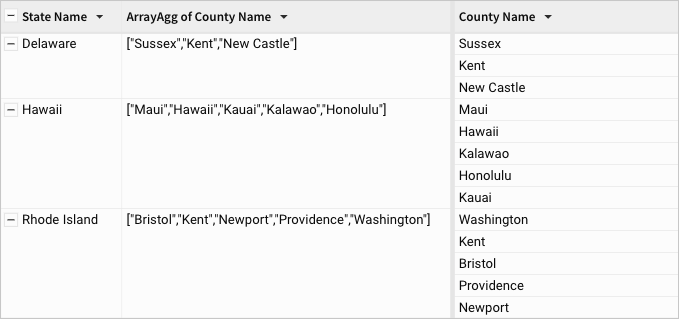
For each grouping (grouped by state name) the ArrayAgg function returns an array containing non-null values from the corresponding rows in the County Name column.